A short guide to how data are managed when using the EUREMAP Marine Bioprospecting Pipeline.
This material is intended to be read in 20 minutes, give or take... If you have any questions or comments please leave an “Issue” in the book’s GitHub repository.
Introduction
The EUREMAP project aims to optimise the marine bioprospecting workflow within the European research community, enabling state-of-the-art research and enhanced capacity for academia and industry. The EUREMAP Bioprospecting Pipeline was developed as part of the EU Commission Horizon Europe programme.
The data management workflow adopted by the project relies heavily on services provided by EMBL-EBI as part of the ELIXIR Research Infrastructure’s contribution to European Open Science Cloud (EOSC) infrastructure. All (meta)data artifacts of a EUREMAP-based project are linked to a single BioProject/Study accession, that itself sits below the EUREMAP BioProject Umbrella Study. Metadata describing samples (e.g. DNA samples, culture samples, etc) from which data are collected are registered in BioSamples. Data created by using a “step” with the EUREMAP pipeline are published in an appropriate repository (e.g. sequence data in EMBL-ENA, metabolomic data in Metabolights, etc) and linked to the BioProject Accession and the BioSamples accession. The figure below shows this data linking for a sequence based experiment.
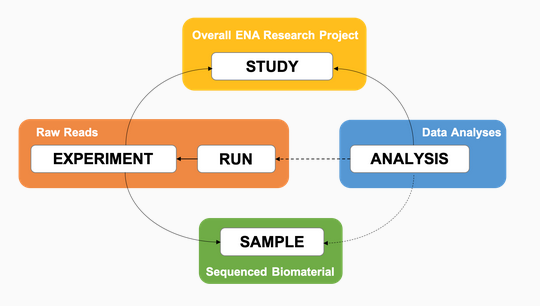
Figure 1: EMBL data linking for a sequencing experiment (credit: EMBL Webin Portal)
Linking the data this way allows multiple data sets to be linked to a single BioSample, and multiple BioSamples and data set types (in different data repositories) to be linked under a single BioProject/Study.
Finally, the BioProject, BioSamples, and data repository accessions are linked to a BioStudies accession. The BioStudies accession describes the experiment and can also contain additional data files (e.g. CSV tables) that could not be included in data-specfic repositories.
Quick Start
1. Open Science Principles
General background information about the importance of data management2. Data Management Plan (DMP)
Create a DMP using the OpenAIRE Argos platform3. EMBL ENA Webin Submission Portal
Create an account in the ENA Webin Submission Portal4. BioProject/Study
Create a BioProject/Study accession from the Webin Portal5. BioSamples
Submit sample metadata to BioSamples through the Webin Portal6. Data deposition
Submit your data to an appropriate data repository, referencing both the relevant
BioSamples and BioProject accessions
7. BioStudies
Create a BioStudies accession using the BioStudies Submission Tool and link BioProject,
BioSamples, additional data files, and all data repository accessions to your
BioStudies accession